Data Modeling for KIA DCE: Hierarchies, Children, and Draft/Publish
Domain modeling notes from the KIA DCE project — a hierarchical division tree, a parent-children content model, and a draft/publish state machine
Summary
- KIA Users → hierarchical division tree (5 levels, parent-linked)
- Content → parent document with 1:1 typed children
- Editing & visibility → draft/publish model
The KIA user hierarchy is given by the client side — it mirrors KIA’s DDMS (Dealer Distributor Management System). The content management structure was designed through back-and-forth among client, designer, and developer.
KIA Users → DCE Divisions
KIA’s DDMS defines 5 user types:
- HQ
- Headquarters — the brand itself (KIA)
- RHQ
- Regional Headquarters — oversees a multi-country region
- NSC
- National Sales Company — KIA’s per-country subsidiary
- Distributor
- Imports and wholesales within a country
- Dealer
- Customer-facing retail outlet
At its most basic, the schema looks like this:
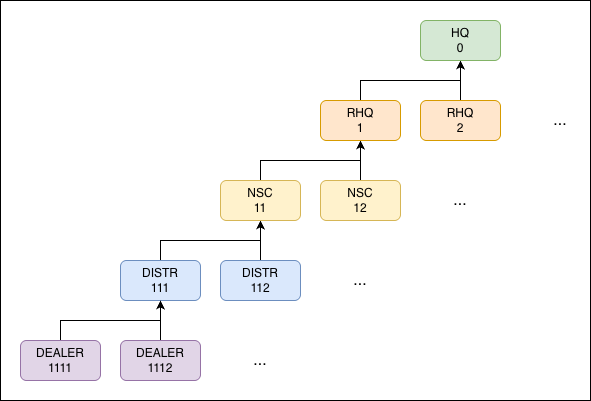 Division hierarchy: HQ → RHQ → NSC → Distributor → Dealer, with sample
 divisionIds
Each division stores both divisionId and parentDivisionId, so the tree is traversable in both directions — needed for dashboard data aggregation, where roll-ups require walking up the parent chain.
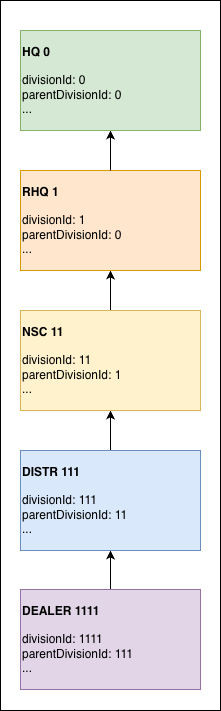 Each level’s fields:
 divisionId + parentDivisionId form the parent-pointer chain
Content Model
Schema
In the idcx-admin client UI, a content looks like:
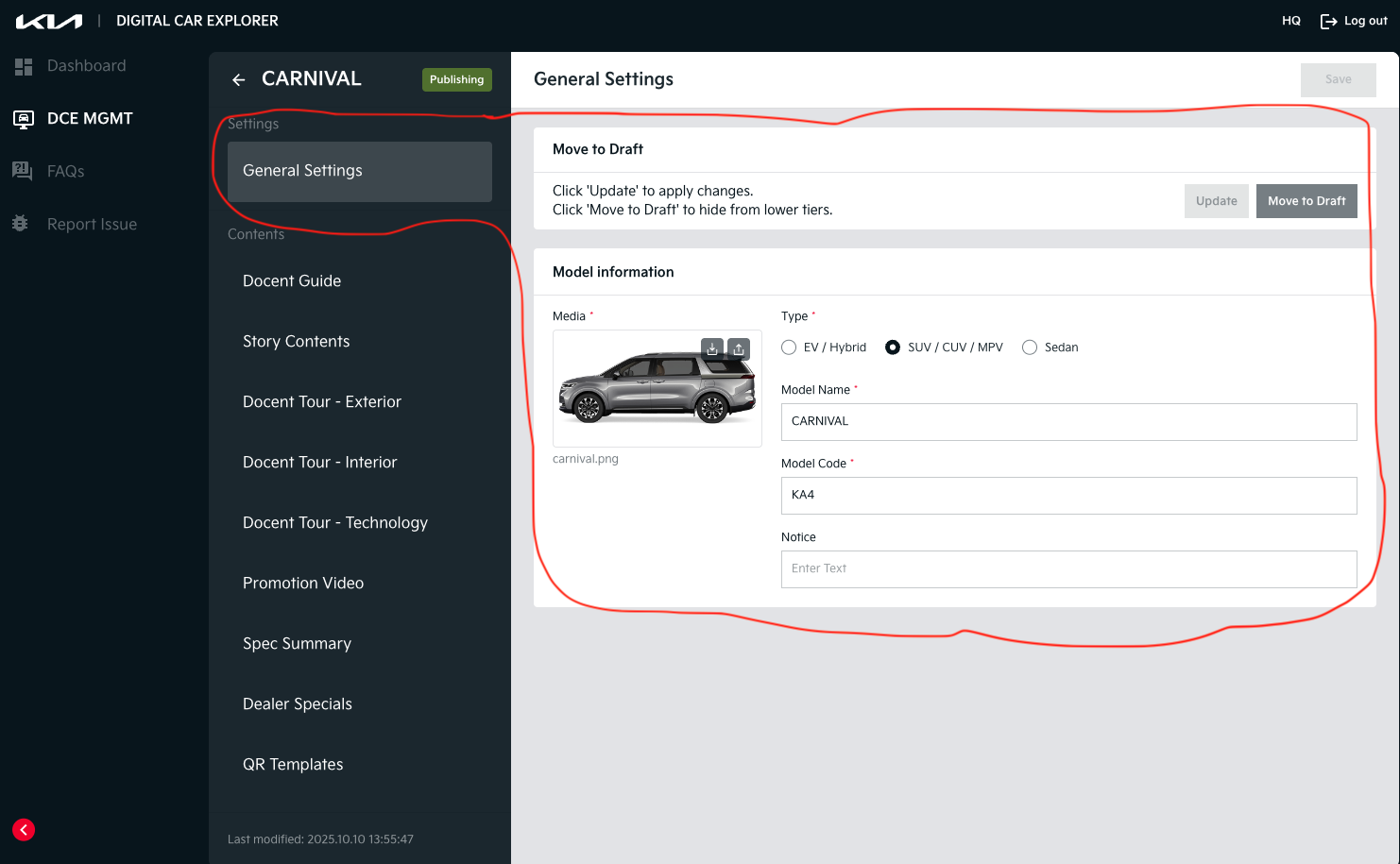 DCE admin UI: one Content (e.g.
 CARNIVAL) with General Settings and a sidebar of its child content types
A Content is the parent document; the sidebar lists its children:
- Docent Guide
- Story Contents
- Docent Tour — Exterior / Interior / Technology
- Promotion Video
- Spec Summary
- Dealer Specials
- QR Templates
Each child is its own document, linked back to the parent via contentId. The relationship is strict 1:1 — each Content has exactly one Guide, one Story, etc.
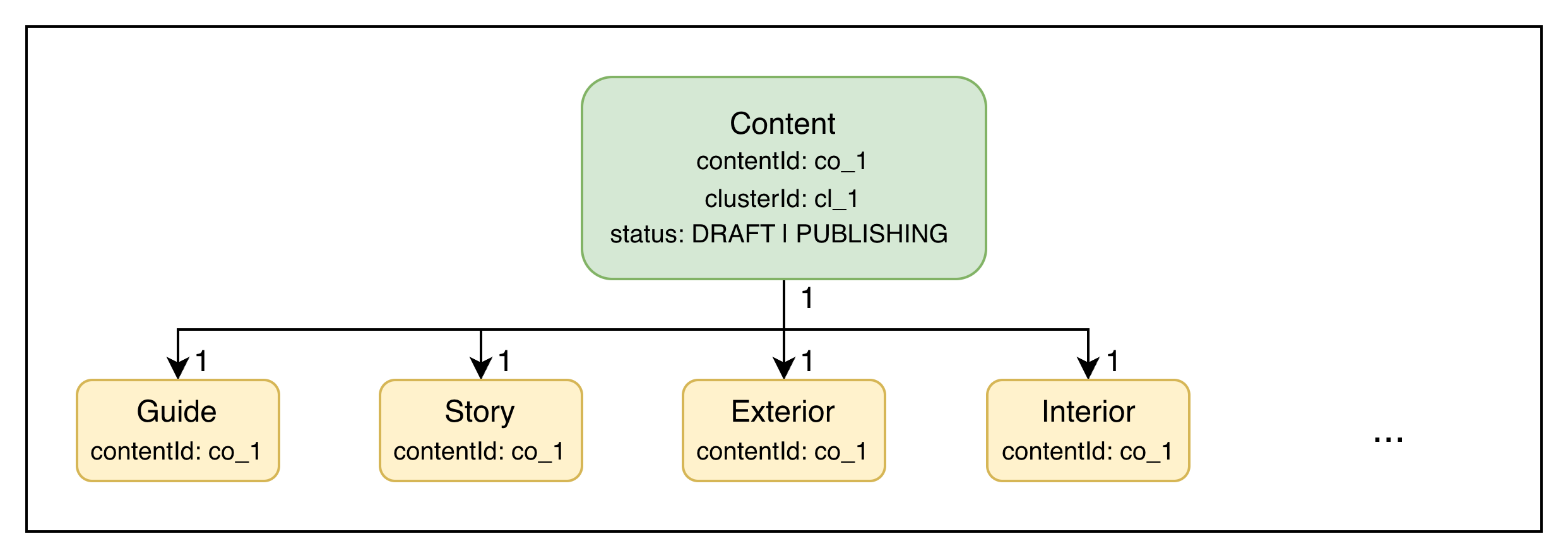 Abstract schema: the parent
 Content (with contentId, clusterId, status) and its 1:1 children that all reference back via contentId
Draft/Publish Lifecycle
Rules
- Only
DRAFTstatus documents are directly editable. PUBLISHstatus documents:- are created by copy on first publish (a new PUBLISH doc gets a new
contentId) or overwrite on re-publish (the existing PUBLISH doc is updated in place). - are visible only to child divisions — e.g. when a DISTRIBUTOR publishes a content, its DEALERs can see and add that content (the DISTRIBUTOR itself keeps editing the DRAFT).
- are created by copy on first publish (a new PUBLISH doc gets a new
The full state machine:
stateDiagram-v2
  [*] --> DRAFT : create
  DRAFT --> PUBLISH : publish (first time → copy creates new doc)
  PUBLISH --> PUBLISH : re-publish (overwrite)

  note right of PUBLISH
    When a child division adds a PUBLISH content,
    a new DRAFT is created at the child
    (new clusterId + contentId).
  end note
In Action
Init. DISTRIBUTOR div_11 has two DRAFT contents (in clusters clu_1 and clu_2). DEALER div_111 has nothing — there’s no PUBLISH content visible to it yet.
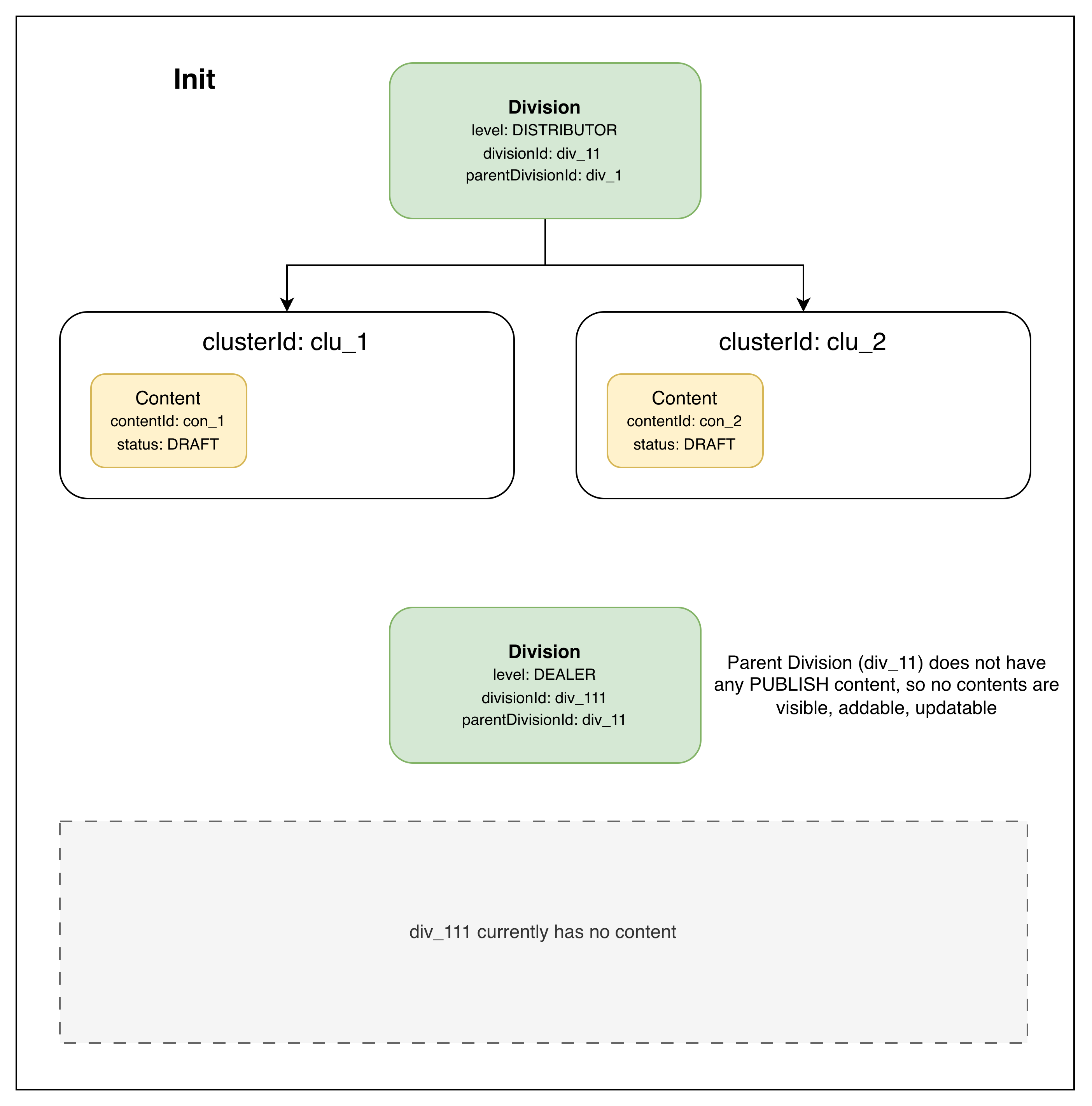 Init: DISTRIBUTOR has two DRAFT clusters; DEALER has no visible content
On Publish. DISTRIBUTOR div_11 publishes the content in clu_1. A new con_2 PUBLISH document is created alongside the existing con_1 DRAFT (1 DRAFT → 0..1 PUBLISH). The DEALER can now see con_2 and add it.
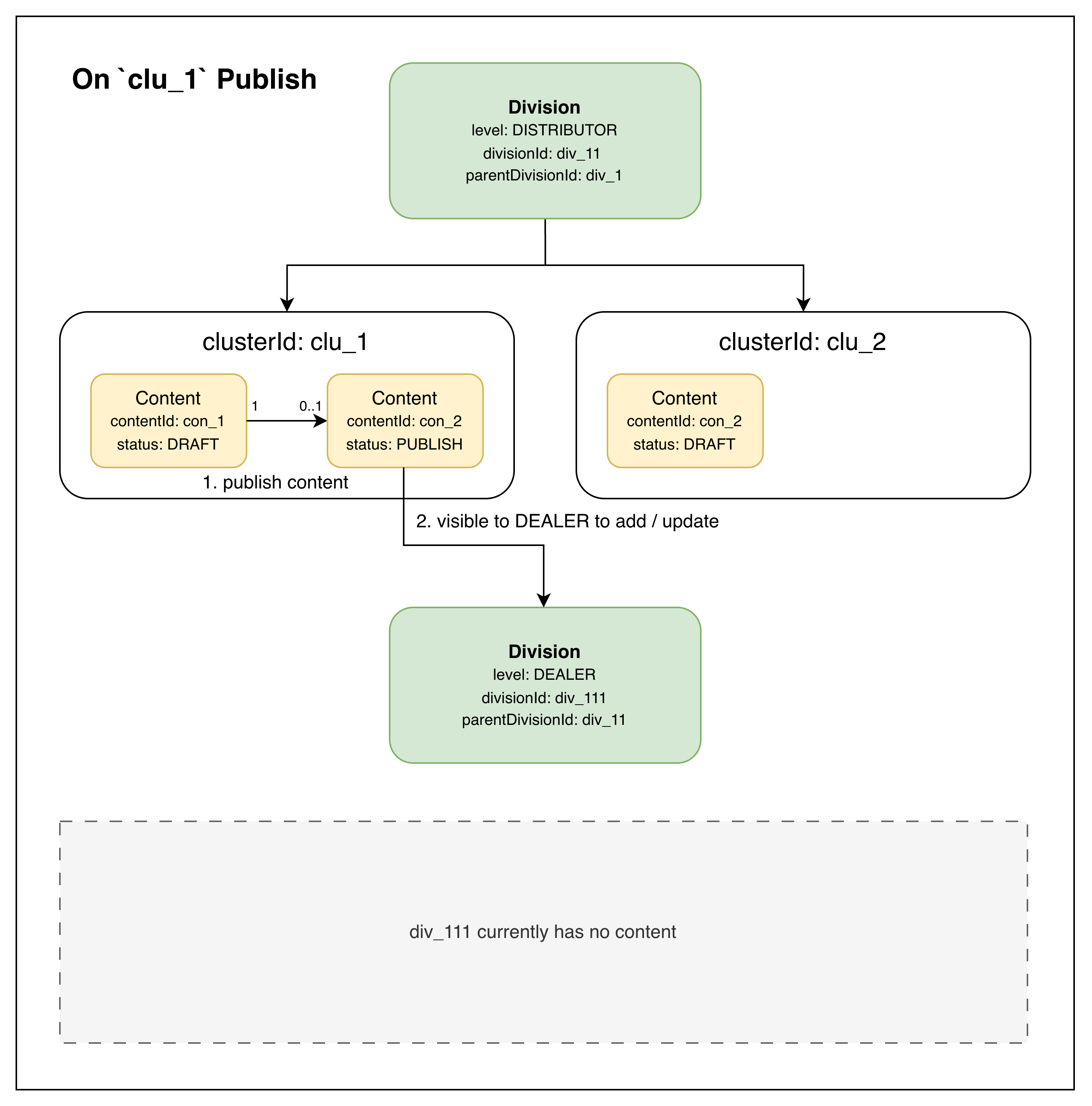 On publish: a new PUBLISH document is created in the same cluster; visible to DEALERs to add or update
On Add. DEALER div_111 adds the published content. A new clusterId (clu_11) and contentId (con_11) are generated for the DEALER’s copy, and the new content starts in DRAFT status — the DEALER can edit it before publishing. (In this case, no further levels exist below DEALER, so the cycle terminates here.)
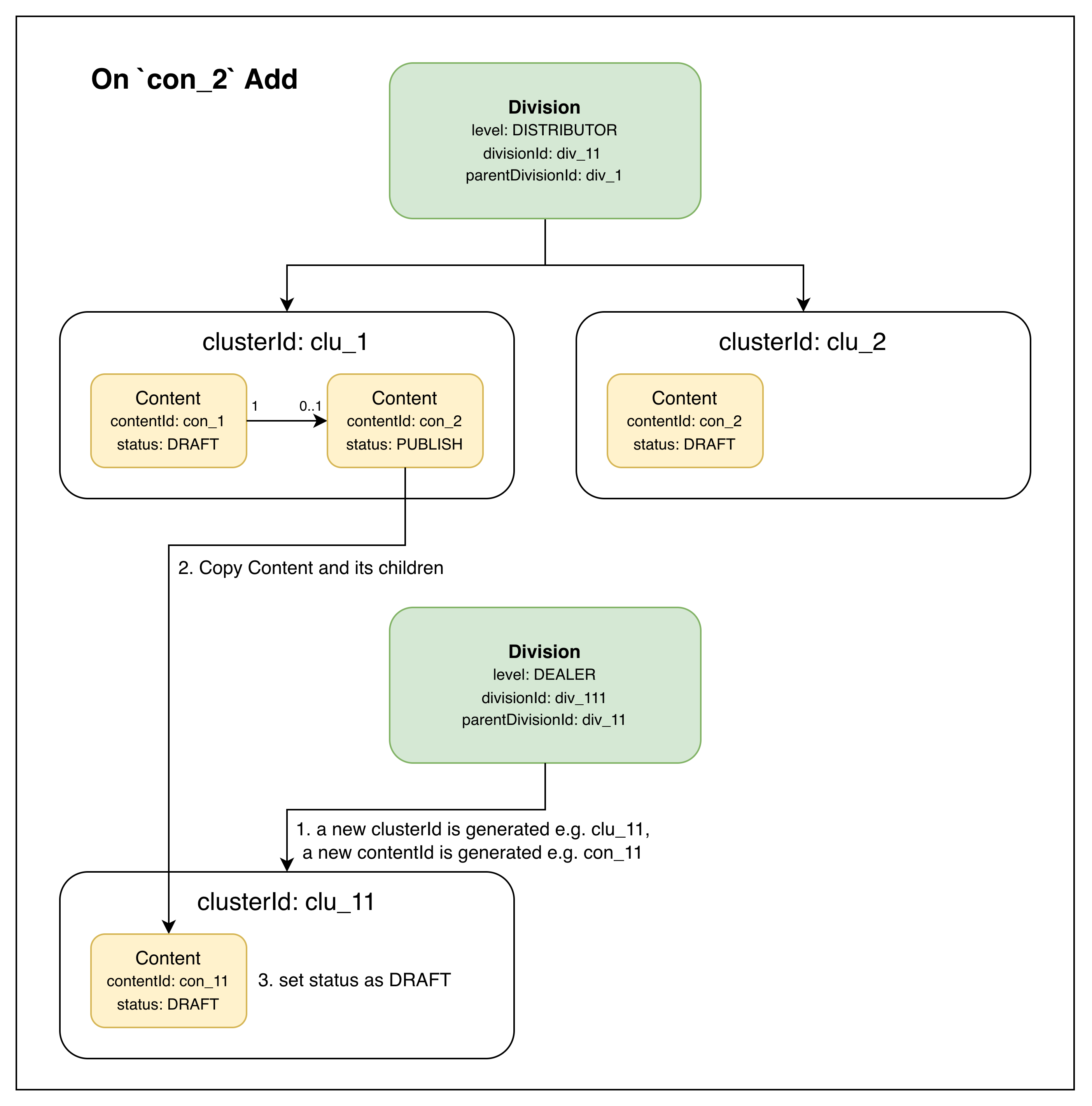 On add: DEALER creates a new cluster + content in DRAFT, copied from the parent’s PUBLISH content
Takeaways
Three patterns are in play here, each chosen to fit a specific constraint:
- Hierarchical tree with stored parent pointers — explicit
parentDivisionIdmakes upward roll-up (dashboard aggregation) cheap. An adjacency-list pattern, not nested-set or materialized-path; chosen because the tree is shallow (5 levels) and reads dominate writes. - Parent-children content with 1:1 typed children — keeps each child’s schema clean and independently evolvable, while the parent tracks aggregate state (
status,clusterId). The UI’s tabbed sidebar maps directly onto the children. - Draft/publish with copy semantics — publishing creates a separate PUBLISH document rather than mutating the DRAFT in place. The editor keeps a working draft while subordinates see a stable snapshot. The cycle repeats per level: a parent’s PUBLISH becomes the next level’s DRAFT (under a new cluster/content id) once added.